> For the complete documentation index, see [llms.txt](https://docs.unbotheredwolves.com/llms.txt). Markdown versions of documentation pages are available by appending `.md` to page URLs; this page is available as [Markdown](https://docs.unbotheredwolves.com/mint-platform/guide/generate-collection.md).
# Generate Collection
From several trait images to a single complete image.
Once your artist has completed the drawing and finalized the traits, it’s time to generate the collection. Generating an NFT collection involves a developer utilizing a set of code along with the collection’s traits to generate a large number of **images**, each with its own corresponding **metadata files**. The typical supply of such collections is around 10,000 NFTs, but the code can theoretically produce millions of images depending on the total number of traits incorporated.
But before proceeding, you need to determine each trait's potential rarity, which will not be the same as the final output but close to it. This can be done by inputting the rarity information on a spreadsheet or Excel. Moreover, you can designate certain traits to avoid others, typically due to incompatibility in their layering.
The rarity subtotal of each trait category must be 100%. For a clearer understanding, refer to the video below, which provides an example. 👇
{% embed url="" %}
As our [Minting Package 5](/mint-platform/pricing.md) includes the generation of your collection, you have the option to choose that instead of generating the collection on your own or with the assistance of a developer. You just have to provide us with the trait images organized in folders and the spreadsheet for their potential rarity.
### **Important: Filenames Format**
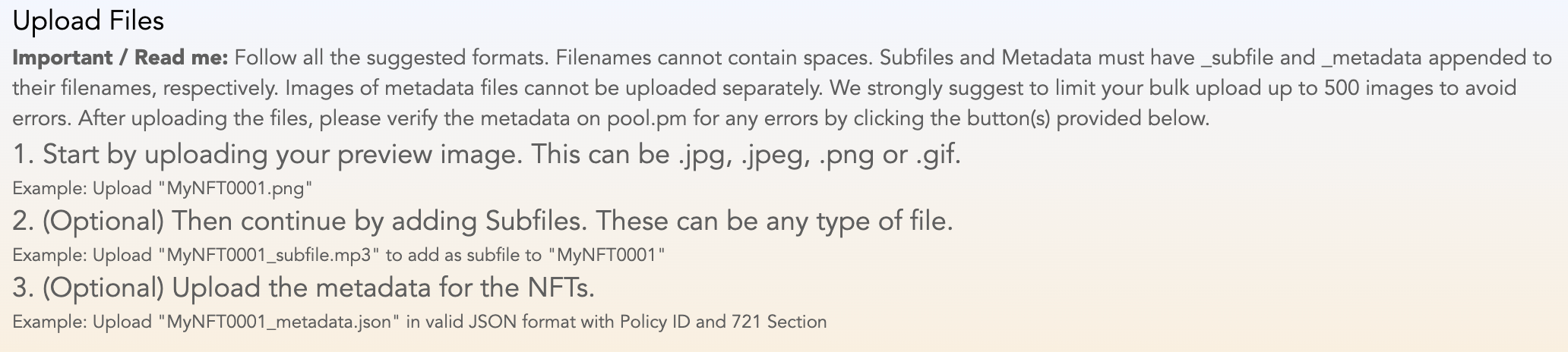
XFORGE follows a strict file naming format that you must follow, as detailed below. 👇 If you don’t adhere to the specified format, your files won’t be uploaded successfully.
### Metadata:
Before we move on to the next step, let’s clarify what NFT metadata is. NFT metadata on Cardano refers to the additional information attached to an NFT. This metadata includes details like the token’s name, description, and image. It’s a crucial part of the NFT as it provides essential information about the digital asset.
One of the standards for NFT metadata on Cardano is CIP-25 (Cardano Improvement Proposal 25). **CIP-25** defines a standard format for storing metadata on Cardano’s blockchain, making it easier for users to understand and interact with NFTs. This includes details like the token’s name, description, and image. The CIP-25 standard also supports additional fields like the token’s creator, the date it was minted, and more.
Click 👉 [here](https://pool.pm/test/metadata?metadata=%257B%2522721%2522%253A%257B%2522e3ff4ab89245ede61b3e2beab0443dbcc7ea8ca2c017478e4e8990e2%2522%253A%257B%2522tappy0824%2522%253A%257B%2522Background%2522%253A%2522AI%2520Overload%2522%252C%2522Background%2520Accessories%2522%253A%2522None%2522%252C%2522Background%2520Portal%2522%253A%2522None%2522%252C%2522Beak%2522%253A%2522Cyborg%2522%252C%2522Body%2522%253A%2522Orange%2520Cyborg%2522%252C%2522Clothing%2522%253A%2522None%2522%252C%2522Eye%2520Color%2522%253A%2522Red%2522%252C%2522Eye%2520Shape%2522%253A%2522Fierce%2522%252C%2522Eyewear%2522%253A%2522Orange%2520Cyborg%2520Eye%2522%252C%2522Foreground%2520Accessories%2522%253A%2522None%2522%252C%2522Headwear%2522%253A%2522None%2522%252C%2522Twitter%2522%253A%2522https%253A%252F%252Ftwitter.com%252FTapTools%2522%252C%2522Website%2522%253A%2522https%253A%252F%252Ftaptools.io%2522%252C%2522image%2522%253A%2522ipfs%253A%252F%252FQmP7Fu5BXQhkvmLLqFNR4QrNQ726JReDXYSJyeinPsC4PC%2522%252C%2522mediaType%2522%253A%2522image%252Fpng%2522%252C%2522name%2522%253A%2522tappy0824%2522%257D%257D%257D%257D) to see a side-by-side sample comparison of metadata input and output of a Cardano NFT. (the link leads to the pool.pm metadata test)